

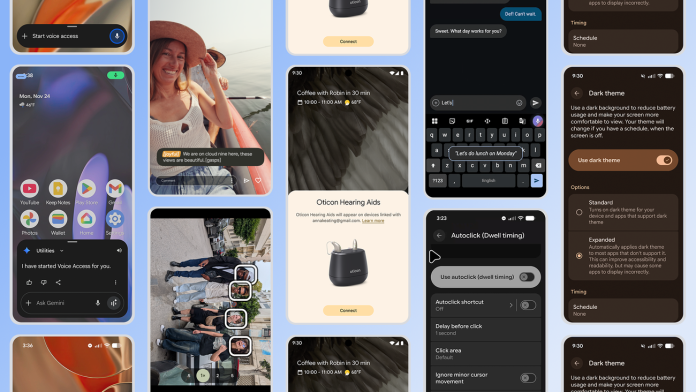
The latest updates from Google promise to significantly enhance the user experience for Android device owners, particularly those within the small business community. These new features focus on accessibility and user interaction, emphasizing how technology can cater to diverse needs. While the innovations provide several benefits, small business owners should also be aware of practical applications and potential challenges as they navigate these changes.
One spotlight feature is the introduction of “Expressive Captions” on YouTube, set to roll out for videos uploaded in English after October. This upgraded captions experience harnesses artificial intelligence to deliver more dynamic and immersive captions. Viewers will see speech intensity displayed in all caps and also receive contextual notes on environmental sounds, such as sighs or gasps. For small businesses utilizing YouTube for marketing, training, or customer engagement, this feature can enhance content accessibility, potentially broadening audience reach and improving viewer engagement. As a result, companies may find that inclusive content can lead to increased customer loyalty and satisfaction.
"With Expressive Captions, we aim to provide a richer, more inclusive viewing experience that can benefit all audiences," a Google spokesperson stated. The goal is clear: to make content more engaging and accessible, thereby helping businesses deliver their messages effectively.
Another noteworthy enhancement is the updated “AutoClick” feature, designed to ease the challenges associated with mouse clicking on Android devices. Many small business owners rely on efficiency in their workflows, and the new dwell cursor experience allows users to customize the duration for which the cursor hovers over an item before executing a click. This adjustment can significantly alleviate physical strain for those who may experience discomfort from repetitive click actions, fostering a more productive work environment.
Additionally, the updated click-type panel now allows users to choose various actions, such as left-click, right-click, double-click, long-press, scroll, or drag. This level of customization could be particularly beneficial for small business owners who often juggle multiple tasks and require adaptable technology solutions to streamline their operations.
While these advancements promote inclusivity and efficiency, small business owners should consider potential challenges arising from new technology implementations. For instance, incorporating enhanced features like Expressive Captions may require businesses to update their content creation strategies or provide additional training for staff to ensure effective use. Additionally, the reliance on AI for captions raises questions about accuracy and interpretation. Businesses may need to invest time in reviewing content to maintain quality standards.
Moreover, while the AutoClick feature aims to reduce physical strain, it may initially lead to confusion for users accustomed to traditional clicking methods. Training may be necessary to fully leverage these new capabilities and ensure smoother transitions in everyday operations.
Small businesses often operate with tight budgets, making adjustments to technology significant from both a financial and operational standpoint. However, adopting tools that promote accessibility can open doors to new audiences and create a more inclusive work environment, ultimately leading to a competitive advantage.
As Google continues to refine its offerings to better serve users with diverse needs, small business owners can leverage these tools to enhance their operational efficiency and customer engagement strategies. Embracing accessible technology may not only improve workflows but also demonstrate a commitment to inclusivity, aligning business practices with the evolving expectations of today’s consumers.
For further details on these advancements, read the original post here.
Image Via Android

