

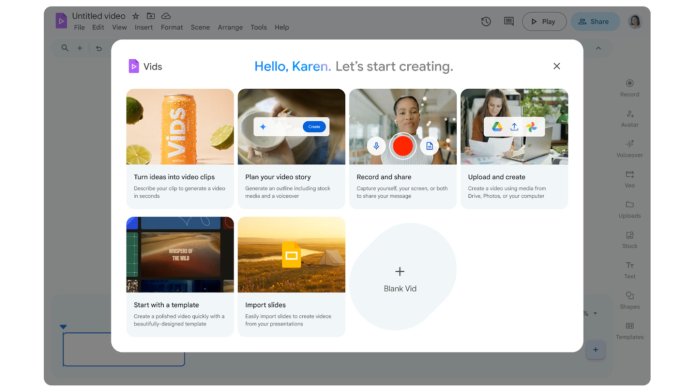
Google has unveiled an exciting new tool for small business owners: Google Vids, an AI-powered video creation app integrated within the Google Workspace suite. Aimed at enhancing internal communication and marketing efforts, this tool simplifies the processes of creating videos for everything from employee training to product demonstrations.
Imagine the ability to produce professional-looking video content without the need for expensive software or extensive technical skills. Google Vids provides just that, making it a valuable asset for small businesses looking to leverage video content in an increasingly digital world.
To get started with Google Vids, Workspace subscribers have several convenient options. They can simply open Google Drive, click the plus icon on the left-hand sidebar, and select the option to create a new Vids project. Alternatively, those logged into their Google account can find Vids among the apps in the top-right corner of their Dashboard. For users preferring a quicker route, visiting vids.google.com or the newly introduced link, vids.new, will effortlessly launch a new project.
The capabilities of Google Vids extend beyond basic video creation. For instance, the tool includes features like Veo 3, enabling users to generate concise, 8-second video clips ideal for quick updates or social media posts. This functionality can significantly enhance engagement, as short, compelling videos tend to capture viewers’ attention more effectively than static images or lengthy text.
While the benefits of incorporating video into business strategies are numerous, some challenges do arise. Small business owners may need to consider bandwidth limitations and the learning curve associated with adopting a new tool. Training staff to use Google Vids effectively may require time and resources, although the intuitive design aims to minimize these hurdles.
"Google Vids represents a game-changer for small businesses looking to improve their training and marketing efforts," said a Google spokesperson. Conveniently integrated into the existing Google Workspace, Vids allows teams to collaborate seamlessly while fostering creativity and innovation.
For small businesses, this tool’s practical applications are wide-ranging. Teams can create onboarding materials that provide new hires with virtual tours or quick tips, allowing for a more engaging introduction than traditional methods. Additionally, product demonstrations can capture potential customers’ interest more dynamically, increasing conversion rates. Video content can also enrich social media strategies, as platforms like Instagram and TikTok prioritize engaging video content.
Small businesses often face competition from larger corporations with deeper pockets for marketing. Google Vids levels the playing field by providing an affordable, accessible solution for creating high-quality content. With the rise in remote work and digital engagement, the need for innovative communication tools has never been more critical, making Google Vids a timely addition to any small business’s toolkit.
Accessing Google Vids is straightforward, and the various entry points mean that business owners can easily engage with the platform as they see fit. The promise of quick video production may encourage small business owners to experiment with their marketing strategies, leading to enhanced brand visibility.
As businesses navigate the ever-changing digital landscape, tools like Google Vids can help them stay agile, allowing for faster responses to market demands and customer needs. The implications of having an effective video creation tool extend beyond just the immediate benefits—it can also cultivate a more dynamic, creative workplace culture.
Given the importance of digital presence and engagement, small business owners would be wise to explore the features offered by Google Vids. They can stay ahead of the curve and stand out in a crowded marketplace by seamlessly integrating video into their workflows.
For further details on the Google Vids launch and its capabilities, visit the original post.
Image Via Google Workspace

