

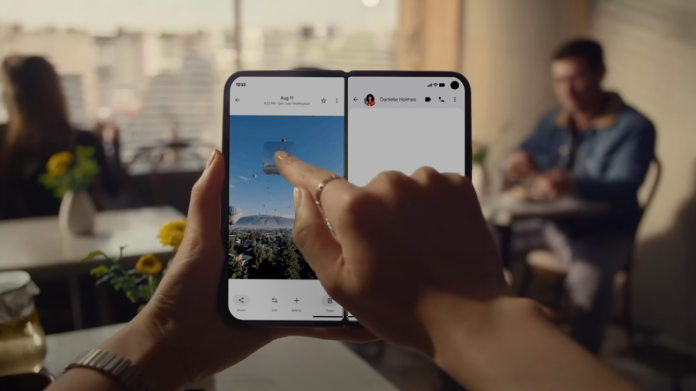
Small business owners are perpetual jugglers, managing multiple tasks from marketing to customer service daily. In a world where time translates to money, any tool that enhances efficiency is a boon. Enter the new drag-and-drop feature for Google’s Pixel 10 Pro Fold, designed to streamline workflows and elevate productivity.
This innovative feature allows users to easily transfer text, images, and files between apps, making it particularly beneficial for small business owners navigating various platforms. With the Pixel 10 Pro Fold’s split-screen mode, multitasking becomes seamless. By dragging content from one application to another, you can expedite daily operations—saving time and reducing the potential for errors that come from toggling between apps.
To utilize this feature, users need to activate split-screen mode on their device. Detailed instructions are available on Google’s support site, guiding even the less tech-savvy through the setup process. Once split-screen is enabled, the functionality kicks in: long-press on text, images, or files in one app, drag it over to another, and drop it into the desired location. For instance, you can move text from a browser directly into a presentation or shift images from Google Photos into a social media post you’re crafting for your business.
The applications are nearly endless. Imagine creating an engaging presentation while on the move—pulling in data and graphics from various sources without needing to switch between apps. In a moment of inspiration, you might snap a photo of a product and instantly drop it into an ongoing blog post or marketing campaign. This flow not only saves time but also minimizes the frustration of managing multiple applications, which is a common issue for small businesses stretched thin on resources.
Customer engagement can also see a boost through this feature. Imagine quickly sharing exciting updates or promotional content with your customer base by dragging images or links directly into communication platforms. This real-time sharing can enhance customer interaction and improve your business’s responsiveness, a key factor for success in today’s fast-paced market.
However, while the drag-and-drop feature offers significant advantages, small business owners should remain mindful of potential challenges. For starters, splitting your screen can sometimes make navigation tricky, especially if you’re not accustomed to this mode. Additionally, some users might experience a learning curve, especially if they’re transitioning from more traditional operating systems. Ensuring that your staff is adequately trained to utilize this feature effectively will be crucial to maximizing its potential.
Moreover, while the Pixel 10 Pro Fold is designed with this functionality in mind, compatibility with all apps may vary. Businesses that rely on specific apps should research if they provide full support for drag and drop. Gathering feedback from team members about what works well can help refine the process and ensure it integrates smoothly into existing workflows.
In conclusion, Google’s Pixel 10 Pro Fold drag-and-drop feature promises to revolutionize how small business owners tackle everyday tasks. By optimizing workflow and minimizing the number of steps required to complete tasks, this innovation may empower you to focus on what matters most—growing your business. As productivity tools continue to evolve, staying informed about the latest advancements can provide a competitive edge. For more details on this feature, check out Google’s original announcement here.
Image Via Google Pixel

