

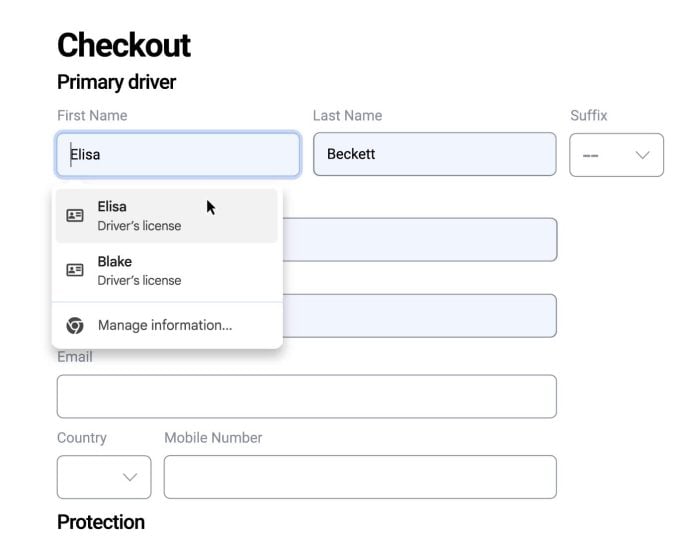
Chrome is upping the game for small business owners with its latest update to the enhanced autofill feature, making online interactions smoother and more efficient. This new functionality is designed to streamline everyday tasks like filling out forms for purchases, registrations, and other essential processes, ultimately saving valuable time for busy entrepreneurs.
Small business owners often juggle multiple responsibilities, and any tool that can automate tedious tasks is a game-changer. With enhanced autofill, desktop Chrome users can now enter important data such as passport and driver’s license numbers, vehicle information like license plates or VINs, and more—all securely stored. As Steve, a small business owner, notes, "This update has the potential to reduce the time I spend on paperwork significantly. Every minute counts when running a business."
The enhanced autofill feature is particularly beneficial for those who frequently engage with regulatory forms, customer applications, or any documentation that requires personal identification. By simplifying the input process, small business owners can not only improve productivity but also enhance the customer experience. For instance, when filling out a form for a new software service or a delivery request, the ability to pre-fill complex data can be invaluable.
A key aspect of this update is its emphasis on security. Chrome assures users that their data is encrypted and stored only with their consent. The browser prompts users to confirm any autofill actions, ensuring full control over what’s being shared. This layer of security is especially important for small business owners who prioritize protecting sensitive customer and personal information.
This new functionality is available globally and supports multiple languages, making it inclusive for a diverse user base. Moreover, Google plans to further expand the types of data that enhanced autofill can manage in the coming months. This adaptability is a boon for small businesses expanding into new markets or tackling varied customer needs.
However, while the benefits are substantial, there are potential challenges small business owners may face when integrating these tools. Firstly, relying heavily on autofill functions may lead to errors if the stored data is outdated or incorrect. Moreover, business owners should be mindful of the privacy implications surrounding data storage. Staying informed about security practices is essential to ensure that customer information remains protected while leveraging these convenient features.
For small businesses already using online platforms for invoicing, client registration, or e-commerce, the enhanced autofill feature could mean fewer errors and less time spent manually inputting information. As companies look to scale, adopting technologies that aid operational efficiency is crucial.
Think of enhanced autofill as a digital assistant that gives you back time to focus on what matters most—growing your business. By maximizing efficiency in data handling, small business owners can redirect their energy towards innovation and customer service, two pillars vital for success.
As the business landscape evolves, tools like Chrome’s enhanced autofill are essential for keeping pace. Whether you’re a solo entrepreneur or managing a small team, this update has the potential to minimize frustration and increase productivity. To learn more about this latest feature, visit the original post. Embracing advancements like this can be the difference between merely managing daily tasks and truly thriving in business.
Image Via Chrome

