

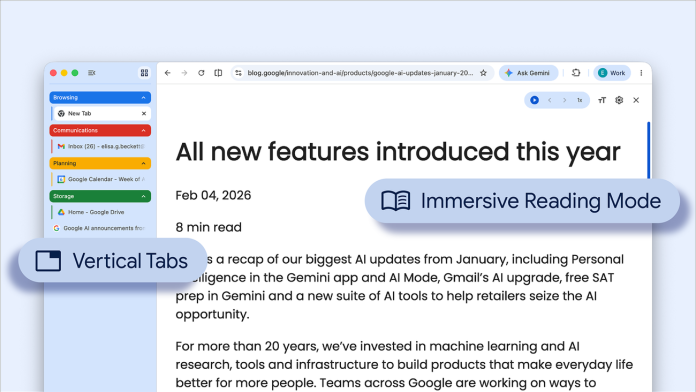
In an era where multitasking defines productivity, Google has made significant strides by rolling out two new features in its Chrome browser, aimed specifically at small business owners looking to maximize efficiency. The recently introduced vertical tabs option promises to transform the way users manage their online workspace, making it seamless and intuitive—even with numerous tabs open.
The feature is simple to activate: users need only to right-click on any Chrome window and select the “Show Tabs Vertically” option. This alteration shifts the organization of tabs from the traditional horizontal layout to a vertical one, allowing for clearer visibility of tab titles and easier management of tab groups. For business owners, this means that navigating between multiple projects or client documents becomes more streamlined, saving valuable time that can be redirected towards core business tasks.
For many small businesses, the challenge of juggling various web-based applications often results in clutter and confusion. A visual cluttered environment can lead to distractions, affecting overall productivity. The vertical tab feature addresses this concern directly by displaying complete page titles in a more accessible format. No longer will users have to hover over tabs or struggle with abbreviated titles to identify the content they need. This benefit is especially pronounced for businesses that rely heavily on browser-based tools and applications.
In speaking to this new feature, a Google spokesperson remarked, “We understand that our users are often juggling numerous tasks at once. With the new vertical tabs layout, we aim to provide a more efficient way to handle multiple projects without the hassle.” This insight underscores the alignment of Google’s product enhancements with the practical, day-to-day needs of small business owners.
However, while the vertical tabs feature offers clear advantages, implementation of new tools or workflows often comes with challenges. For instance, some users may find adjusting to a new layout initially cumbersome, particularly if they have developed a habit around the traditional tab organization. Small business owners should be prepared for a transition period during which they may need to train themselves and their teams to adapt to the new format.
Moreover, there may be aesthetic considerations. Businesses focused on branding and visual presentation may need to weigh the impact of this layout change on their team’s workflow versus its practical advantages. Familiarizing staff with the functionality of vertical tabs could take time, so business owners should consider how best to approach this training to minimize disruption.
Beyond the vertical tab feature, Google has also introduced enhancements aimed at overall productivity within Chrome. Managing multiple projects, particularly with remote teams or diverse client needs, is now more efficient with these updates. All of these factors contribute to a more cohesive working environment, allowing small business owners to focus on what matters most: driving growth and serving their customers effectively.
For the small business owner, integrating this new functionality could mean both an increase in productivity and an opportunity to reshape team dynamics around collaboration. With the capability to see more tab options clearly and the ease of organized access, teams can better share information and stay aligned on objectives.
As Google continues to seek out innovative methods for enhancing user productivity, small businesses stand to gain significantly from these improvements in browser technology. By adopting the vertical tabs feature in Chrome, small business owners can leverage their time more effectively, potentially enhancing operational efficiency across various aspects of their businesses.
For those interested in exploring this new feature in detail, further information can be found in the original announcement by Google here. Leveraging cutting-edge tools and technologies may just be the edge that small businesses need to thrive in today’s competitive landscape.
Image Via Chrome

